
Manga Generator
Write the scene, pick a genre and the panel count. This manga generator draws the page. Your first one is free, no sign-up needed.
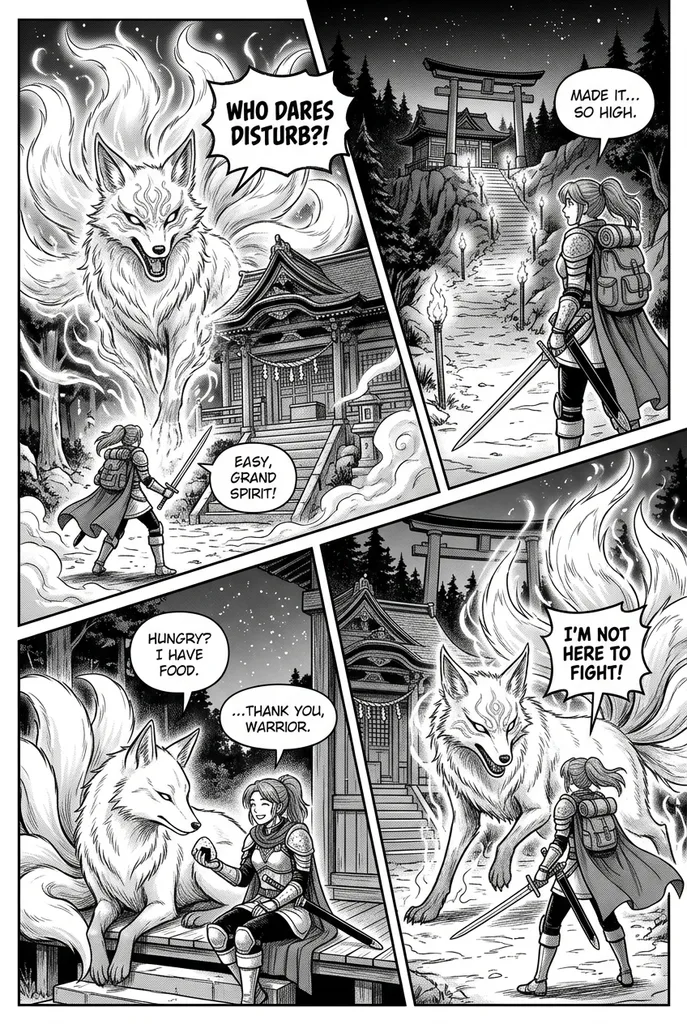
Example result. Pick your options to make yours.
Examples
What this manga AI draws for you
One story line in, one finished manga page out.
This manga generator turns a short story into a single manga page. You write what happens in up to 300 characters, choose a genre, a panel count and black and white or full color, and press the button.
The request asks for one page as one image, with clear gutters and panels of different sizes and angles, laid out like a printed manga page. The same characters should keep the same face, hairstyle and outfit in every panel. Short speech bubbles with a few words of English are allowed.
You need no drawing skills and nothing to upload. Each run of the manga generator makes one page, so it suits a scene, a pitch or a first look at an idea, not a whole chapter.
That page lets you test how a scene reads before you spend hours drawing it by hand.
Made for
- Aspiring mangaka
- Webcomic writers
- Fan fiction authors
- Tabletop game masters
- Hobby storytellers
How to write a story line for a manga generator
Name your characters and give each one a look: hair, clothes, one prop. The request asks for the same characters in every panel, and a visible detail gives the model something to repeat.
Then describe a start, a turn and an end, such as a swordswoman at a mountain shrine who meets a giant fox spirit. With 300 characters you have room for one scene, not a plot with five twists.
A clear story line is the whole input the manga generator gets, so spend your characters on who, where and what changes.
Panels, genres and reading order in the manga generator
A manga page is read right to left and top to bottom, and the request says so. Pick 3 panels for one beat, 4 for the default scene, or 6 for a short sequence. The request asks for exactly that many panels.
The genre sets the mood. Shonen Action asks for speed lines and dramatic close-ups, Shojo Romance for delicate linework and sparkles, Fantasy for detailed costumes and magic, Comedy for exaggerated reactions, and Slice of Life for calm everyday scenes.
The manga generator defaults to Shonen Action with 4 panels in black and white, so your story is the only thing you must add.
Why use this ai manga generator
Five things the manga generator does, and what it leaves out.
Black and white with screentone
The default asks for inked linework and screentone shading, no color. In our run with Fantasy and 4 panels, the page came out in black ink with screentone. Full color asks for soft cel shading. Check the look on your own story before you share it.
Right-to-left reading order
The manga generator asks for a page read right to left, top to bottom. In our run, the four panels followed that order.
The same cast across panels
The request asks for identical faces, hairstyles and outfits in every panel. In our run, the same armored swordswoman and the same nine-tailed fox appeared in all four. It is AI output, so check each panel.
Speech bubbles included
The bubbles hold a few words of English, and in our run they were readable. Other text, watermarks and signatures are not part of the request.
Your first page is free
Your first image is free, with no sign-up and no credit card. The free allowance is one image for each visitor across the whole site. Try the manga generator on your best scene first, since the first page is the only free one.